Master Fluid Art with the Photoshop Drip Watercolor Brush Set
There is a specific kind of frustration that comes with trying to replicate organic media in a digital environment. You want the unpredictability of water hitting paper, the way pigment pools and drips, but standard digital tools often feel too sterile or uniform. This is where a dedicated Photoshop Drip Watercolor Brush Set changes the workflow entirely. Whether you are a seasoned graphic designer, a hobbyist illustrator, or a content creator looking to add texture to your social media graphics, having the right tools can bridge the gap between rigid pixels and fluid artistry.
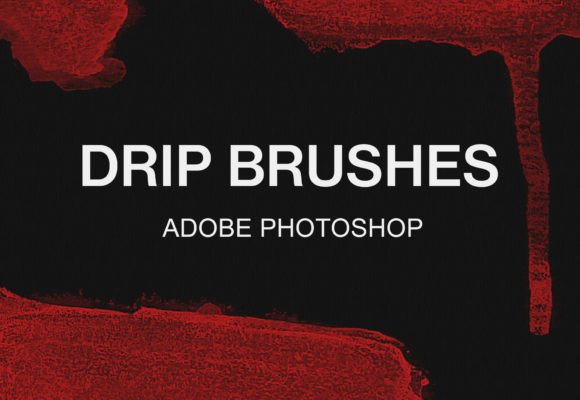
The collection known as the 11 Photoshop Drip Watercolor Brush Pack offers a curated selection of tools designed specifically to mimic these natural phenomena. Unlike generic round brushes with opacity jitter, these assets are engineered to create authentic runs, bleeds, and heavy saturation points that occur when watercolor paint meets a wet surface. The result is artwork that feels tactile and alive, even on a screen.
Why Organic Texture Matters in Digital Design
In an era where much of our visual consumption happens on high-resolution screens, there is a growing appetite for imperfection. Perfectly smooth gradients and vector lines can sometimes feel cold or corporate. Introducing the chaos of a drip or the grain of a wash adds a human element to digital projects. For marketers and brand strategists, this translates to higher engagement; audiences connect more deeply with visuals that evoke sensory memories of traditional art supplies.
Using a Photoshop Drip Watercolor Brush Set allows professionals to inject this personality without the mess of physical paints. It streamlines the creative process, offering the aesthetic benefits of wet media with the undo functionality and layer management of modern software. This efficiency is crucial for freelancers and business owners who need to iterate quickly while maintaining a high-quality, hand-crafted look.
Key Characteristics of the Bundle
This specific bundle stands out because of its versatility and ease of integration. The pack includes eleven distinct brush variations, each tuned to behave differently under pressure and speed. Some are designed for heavy, slow drips that suggest thick pigment, while others simulate quick splatters or subtle runs. The texture within the brush tips ensures that edges aren't too sharp, replicating the way fibers in paper absorb moisture.
One of the most significant strengths of this toolset is its cross-platform compatibility. While optimized for Adobe Photoshop, the ABR Photoshop brush file format is also fully supported by GIMP. This is a vital consideration for educators, students, or creators working within open-source ecosystems who refuse to compromise on quality due to budget constraints. The ability to use the same high-fidelity textures across different software environments ensures consistency in your portfolio, regardless of the tool you are using at the moment.
Practical Applications Across Industries
The utility of these brushes extends far beyond simple illustration. In the world of web design and UI, a subtle watercolor background can soften the interface, making an app feel more approachable and less industrial. For bloggers and publishers, custom headers created with drip effects can establish a unique visual identity that separates their content from template-heavy competitors.
Consider the needs of a marketing team launching a summer campaign. Using the 11 Photoshop Drip Watercolor Brush Pack, they can create promotional imagery that evokes feelings of refreshment and fluidity, perfectly aligning with seasonal themes. Similarly, educators creating digital lesson plans can use these textures to make materials feel more inviting and less like standard corporate training documents.
For fine artists transitioning to digital mediums, these brushes serve as a reliable bridge. They allow for the exploration of composition and color theory without the drying time or material costs associated with physical canvases. You can experiment with bold, risky strokes knowing that a single click can reset the canvas, encouraging a level of creative freedom that is often stifled by the fear of ruining expensive paper.
Seamless Integration into Your Workflow
Adopting new digital assets should never be a hurdle. The developers of this set have prioritized user experience, ensuring that installation is intuitive for both Windows and Mac users. The goal is to get you creating immediately, minimizing the time spent on technical setup.
Below are the straightforward steps to get these tools up and running in your preferred software.
How to Install and Use in Adobe Photoshop
If you are working within the Adobe ecosystem, the process is nearly instantaneous. The system recognizes the native file format automatically.
- Unzip the file: Locate the downloaded archive on your computer and extract the contents to a folder you can easily access.
- Activate the brushes: Simply double-click on the included .abr file.
- Verify loading: Photoshop will launch (or bring itself to the front if already open), and the new brushes will automatically appear at the bottom of your Brush panel.
- Start creating: Select a brush, adjust your size and flow, and begin applying organic textures to your layers.
How to Install and Use in GIMP
For those utilizing GIMP, the process requires manually placing the file in the correct directory, but it remains a simple task.
- Locate the GIMP folder: Search your local disks for the GIMP installation directory. This is often found within the "Program Files" folder on Windows.
- Navigate the path: Follow the specific directory structure: GIMP 2 > share > gimp > 2.0 > brushes.
- Prepare the file: Unzip the downloaded archive to access the .abr file.
- Copy and paste: Move the .abr file directly into the brushes folder identified in step two.
- Refresh and create: Restart GIMP or refresh the brushes dialog, select your new watercolor tools, and let your creativity flow.
Making the Most of Your Textures
Once installed, the real work begins. To get the most realistic results, avoid using these brushes at 100% opacity constantly. Real watercolor relies on transparency and layering. Try building up color gradually, allowing underlying layers to peek through. Experiment with the "Flow" setting in Photoshop or the "Dynamics" in GIMP to simulate the varying pressure of a hand holding a brush.
It is also worth noting that these brushes perform exceptionally well when paired with textured paper overlays. By placing a high-resolution paper scan on a layer above your painting and setting the blend mode to "Multiply" or "Overlay," you can enhance the grain effect, making the digital drips look as though they are sitting physically on the surface.
Whether you are designing a logo, illustrating a children's book, or crafting a unique background for a website, the Photoshop Drip Watercolor Brush Set provides the necessary nuance to elevate your work. It removes the technical barriers to achieving complex fluid effects, allowing you to focus purely on the artistic outcome.
Ready to expand your creative toolkit? Visit our shop to explore this bundle and discover more professional brush collections designed to streamline your workflow and enhance your digital artistry.