Kids Doodles Brushet: Add Innocent Flair to Crafts
There is a distinct power in simplicity. In a digital landscape often cluttered with hyper-realistic textures and complex gradients, the raw, unpolished charm of a child's drawing cuts through the noise. The Kids Doodles Brushet captures this specific energy, offering a curated set of Procreate brushstrokes that mimic the innocent and spontaneous nature of childhood art. This tool is not just about replicating a style; it is about injecting warmth, approachability, and a touch of nostalgia into your digital projects. Whether you are an educator designing worksheets, a marketer crafting a friendly social media campaign, or a hobbyist journaling your daily thoughts, these brushes provide an immediate visual language that says "human" and "handmade."
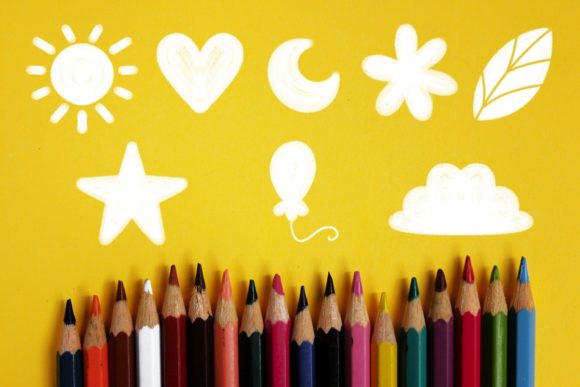
The collection includes seven essential symbols: a sun, heart, moon, stars, leaf, balloon, and a cloud. While these elements seem basic, their application is remarkably versatile. The files come in the .brushset format, meaning they are ready to import directly into Procreate on iOS and iPadOS. Once installed, they function like any native brush, responding to pressure and tilt depending on your specific settings, but retaining that characteristic wobbly, organic line quality that defines hand-drawn doodles.
Why Embrace the Imperfect Line?
Professional designers often spend hours trying to make vector lines look "natural." The beauty of the Kids Doodles Brushet is that the imperfection is built-in. This aesthetic serves a psychological purpose. For brands and creators, using child-like imagery can lower barriers between the content and the audience. It feels less corporate and more personal. When a small business owner uses a hand-drawn heart or a wobbly sun on an invoice or a thank-you card, it adds a layer of authenticity that polished typography cannot achieve.
For educators, this utility is even more direct. Worksheets and learning materials designed for young children benefit immensely from visuals that look like they were drawn by a peer or a caring teacher rather than generated by a cold algorithm. A math worksheet featuring hand-drawn stars for counting or a science page with a sketched leaf feels more inviting to a student. It creates a cohesive visual environment where the medium matches the message.
Creative Applications Across Industries
The versatility of this brush set lies in its ability to adapt to various contexts without losing its core identity. Here is how different professionals can leverage these tools effectively:
- Educators and Tutors: Create engaging headers for lesson plans, design reward charts with stamped stars and balloons, or illustrate story prompts. The cloud and moon brushes are perfect for calming bedtime routine charts.
- Content Creators and Bloggers: Use the doodles to highlight key points in Instagram stories or Pinterest graphics. A hand-drawn arrow or a circled note using the leaf or heart motif draws the eye naturally without looking like a standard UI element.
- Small Business Owners: Incorporate the sun or heart into packaging designs, stickers, or handwritten-style notes included in shipments. This reinforces brand personality and makes the unboxing experience memorable.
- Digital Planners and Journalers: Enhance daily logs with mood trackers using the moon phases or weather logs using the cloud and sun. The organic feel fits perfectly with the bullet journaling aesthetic.
- Marketers: Break up text-heavy ads with playful icons. A campaign focused on community, family, or sustainability can use the leaf and heart to subtly reinforce themes of growth and care.
Techniques for Consistent and Polished Results
While the goal is to achieve a loose, hand-drawn look, there is a difference between "charmingly imperfect" and "sloppy." To ensure your final output remains professional and clear, consider these practical approaches when using the Kids Doodles Brushet.
First, pay attention to scale. Because these brushes mimic thick marker or crayon strokes, they can lose definition if scaled down too small. Use them as focal points or accent elements rather than intricate background patterns. When placing a star or a balloon next to text, ensure there is enough breathing room so the doodle doesn't compete with the legibility of your words.
Second, think about color theory. Child-like drawings often utilize bright, primary colors, but you can elevate the look by using a muted, pastel palette or even monochromatic schemes. Try using a dark charcoal grey instead of pure black for the outlines; this softens the contrast and makes the doodle feel more integrated into a modern design layout. You can also experiment with layer blending modes in Procreate. Placing a doodle on a "Multiply" layer over a textured paper background can simulate the look of ink soaking into fiber, adding depth to the flat digital stroke.
Mixing Styles for Unique Compositions
Do not feel restricted to using the doodles in isolation. One of the most effective ways to use this set is to combine it with other design elements. Pair the wobbly outline of a cloud with crisp, sans-serif typography for a striking contrast between order and chaos. Or, use the heart and leaf brushes to create custom borders around photographs, framing personal images with a sense of warmth.
You can also animate these static brushes. Since Procreate supports animation assist, you can draw a sequence of the moon changing phases or a balloon floating upward. These simple animations are incredibly effective for social media stories, adding movement that feels organic rather than mechanically tweened. The inherent irregularity of the brush strokes ensures that even when animated, the motion retains a human touch.
Maximizing Workflow Efficiency
For freelancers and agencies working under tight deadlines, speed is essential. The Kids Doodles Brushet eliminates the need to sketch these common icons from scratch every time. Instead of spending ten minutes drawing a perfect yet playful sun, you can stamp it instantly and adjust the size. This efficiency allows you to focus on the broader composition and messaging of your project.
To keep your workflow organized, create a dedicated layer group for your doodles. This allows you to adjust the opacity or color of all your decorative elements simultaneously without affecting the rest of your design. If you are creating a series of documents, such as a set of weekly planners or a sequence of educational slides, save your favorite color combinations as swatches. This ensures consistency across all pages, making the final product feel cohesive and thoughtfully designed.
Ultimately, the value of this tool extends beyond the seven shapes included. It is an invitation to embrace a lighter, more joyful approach to digital creation. In a world that often demands high-fidelity perfection, the Kids Doodles Brushet reminds us that there is immense value in the simple, the sketchy, and the sincere. By integrating these elements into your work, you are not just decorating a page; you are connecting with your audience on a more emotional, human level.